


Apple Laptop Screen Replacement — Retail & Wholesale
Cracked, flickering or dead MacBook display? We repair single units on the spot in our Melbourne CBD workshop, and supply bulk screen panels (5+ units) to repair shops and resellers at wholesale pricing.
What’s covered
- All MacBook Pro & MacBook Air models (Retina, Touch Bar, M1/M2/M3)
- Cracked glass, LCD/backlight failure, screen bleed, flicker
- Genuine & high-grade compatible panels
- Bulk wholesale supply for repair shops (5+ units)
- Walk-in, no appointment needed
Every MacBook screen we supply, by model
Pick your MacBook, or search by the “A” number printed on the underside (for example A2338). Then tap your colour to open that screen.
Model A1398
Choose your colour
Silver (2012–2013)Silver (2013–2014)Silver (2015)
Model A1534
Choose your colour
Space Grey (2015)Silver (2015)Gold (2015)Space Grey (2016–2017)Silver (2016–2017)Gold (2016–2017)Rose Gold (2016–2017)
No match yet. Check the A number on the underside of your MacBook, or send us your model and we’ll source it.
Can’t find your model? Contact us or call (03) 9663 9111.
From cracked to like-new
Every screen we replace goes from shattered and unusable to crisp, bright and fully functional — usually within the same day.
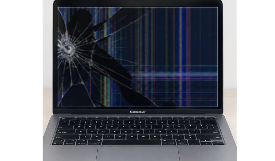
Shattered glass, dead pixels, unresponsive touch — common after a drop or impact.
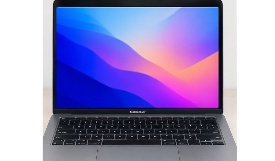
Brand-new panel installed — full brightness, true colour and a screen that looks brand new.
Is your MacBook screen showing any of these signs?
A damaged display isn’t always a cracked one. These are the faults we see most often at our Melbourne CBD workshop — and every one of them is fixable.
Cracked or shattered glass
Usually from a drop, a knock in a bag, or something left on the keyboard when the lid was closed. Even small cracks tend to spread over time.
Lines, dead pixels or ink spots
Vertical or horizontal lines, black blotches or patches of colour mean the LCD panel underneath has been damaged, even if the glass looks fine.
Flickering or a dim backlight
A screen that flickers, dims or shows a “stage light” glow along the bottom edge often points to a worn display cable — common on some older MacBook Pro models.
Peeling anti-glare coating
Blotchy, stained-looking patches that won’t wipe off are the anti-reflective coating wearing away. It can’t be cleaned or polished back — the panel needs replacing.
Black screen, but the Mac is on
You can hear the startup chime or see the keyboard light, but nothing appears on screen. We test with an external display to confirm whether it’s the panel or the logic board.
Liquid or impact damage
Spills that reach the display, a bent lid or a loose hinge can all affect the screen. Bring it in early — the sooner it’s checked, the more we can usually save.
Genuine or high-grade compatible — which panel is right for you?
We stock both, and we’ll always explain the difference before you decide. Here’s a quick side-by-side to help.
| Genuine Apple panel | High-grade compatible panel | |
|---|---|---|
| Colour & brightness | Factory-matched colour, brightness and viewing angles | Tested for bright, even colour — very close to original |
| Best suited to | Newer M1 / M2 / M3 MacBooks, professional use, devices you plan to resell | Older MacBooks, budget-conscious repairs and bulk trade orders |
| Cost | Higher | Lower |
| Quality checks | Tested on your device before handover | Every panel tested before fitting or dispatch |
| Warranty | Covered by AMT warranty [confirm period] | Covered by AMT warranty [confirm period] |
Not sure which to choose? Your free quote will include both options so you can compare them side by side.
What affects the cost of a MacBook screen replacement?
Every MacBook is different, so we quote each repair individually after a free diagnosis. No guesswork, no surprise charges — you approve the price before we start.
Your model and screen size
A 13″ MacBook Air panel is priced differently to a 16″ MacBook Pro Liquid Retina XDR display.
Genuine or compatible panel
Genuine Apple parts cost more; high-grade compatible panels offer a more affordable alternative.
Panel only or full display assembly
On most Retina and Apple silicon MacBooks the glass and LCD are fused together, so the whole display assembly is replaced as one unit.
Any additional damage
A bent lid, damaged hinge, worn display cable or liquid exposure is checked during diagnosis and included in your quote upfront.
Who our wholesale screen program is built for
If you repair, refurbish or manage Apple laptops in volume, a trade account gives you reliable stock without the overseas wait times.
- Independent repair shops needing a dependable local supplier for MacBook panels
- IT resellers and refurbishers preparing devices for resale
- Schools and universities maintaining student and staff MacBook fleets
- Corporate IT teams and MSPs keeping business laptops in service
What to include in your wholesale enquiry
- Model number — the “A” number on the underside of the MacBook (e.g. A2338)
- Quantity per model — minimum 5 units in total
- Panel grade — genuine, compatible, or a mix
- Delivery postcode — we ship tracked across Australia
- One-off or ongoing — so we can set up recurring supply if needed
A few quick steps before you drop off your MacBook
None of these are required, but they help us get your laptop back to you faster.
Back up if you can
A screen replacement doesn’t touch your storage, but a Time Machine or iCloud backup is always good practice. Can’t see the screen? Connect an external monitor to reach your files.
Have your login handy
Knowing your Mac’s login password lets our technicians fully test brightness, colour and True Tone after the new screen is fitted.
Bring your charger
If the battery is flat, having your own charger means we can start diagnostics straight away — no waiting for it to power up.
MacBook screen replacement questions, answered
How long does a MacBook screen replacement take?
Most screen replacements are completed the same day at our Melbourne CBD store. If your model needs a less common panel, we’ll let you know the timeframe upfront when we quote.
Will I lose my data during the repair?
No. Replacing the display doesn’t involve your storage, so your files, apps and settings stay exactly as they are. We still recommend a backup before any repair, just as a precaution.
Do you use genuine Apple screens?
We offer both genuine Apple panels and high-grade compatible panels. Your quote includes both options so you can choose based on your model, budget and how you use your MacBook.
Can you replace just the cracked glass?
On most Retina and Apple silicon (M1, M2, M3) MacBooks, the glass and LCD are bonded into a single display assembly, so a cracked screen means replacing the whole assembly. We’ll confirm what your model needs during the free diagnosis.
Is screen damage covered by Apple warranty or AppleCare?
Accidental damage such as a cracked screen isn’t covered by Apple’s standard limited warranty. AppleCare+ may cover it with a service fee. Not sure where you stand? Use our free Apple warranty check before you book.
Is it worth replacing the screen on an older MacBook?
Often, yes — especially if the rest of the laptop runs well. A compatible panel can keep an older MacBook going for years at a fraction of the cost of a new one. If a repair doesn’t make sense, we’ll tell you honestly.
Do I need to book an appointment?
No appointment is needed. Simply walk in to 381 Elizabeth Street, Melbourne, Monday to Saturday, or call us on (03) 9663 9111 to check part availability first.
What warranty comes with a screen replacement?
Every screen we fit and every panel we supply is covered by our [X-month] warranty on parts and labour. Accidental damage after the repair isn’t included.
What is the minimum order for wholesale screen panels?
Wholesale pricing starts from 5 units, with tiered rates that lower your per-unit cost as quantities increase. Ongoing trade accounts and recurring supply agreements are also available.
Do you deliver wholesale orders outside Melbourne?
Yes. We supply repair shops, resellers and IT businesses across Australia, with bulk orders packed and sent via tracked delivery.
Need something else fixed while you’re here?
Our technicians handle much more than screens. Explore our other Apple and laptop repair services in Melbourne CBD.
Our store at 381 Elizabeth Street is an easy trip from Carlton, North Melbourne, Docklands, Southbank, Fitzroy and the wider inner city — with trams running right along Elizabeth Street.